Creating a Zlendo Realty Account
Zlendo Realty Account for Individuals
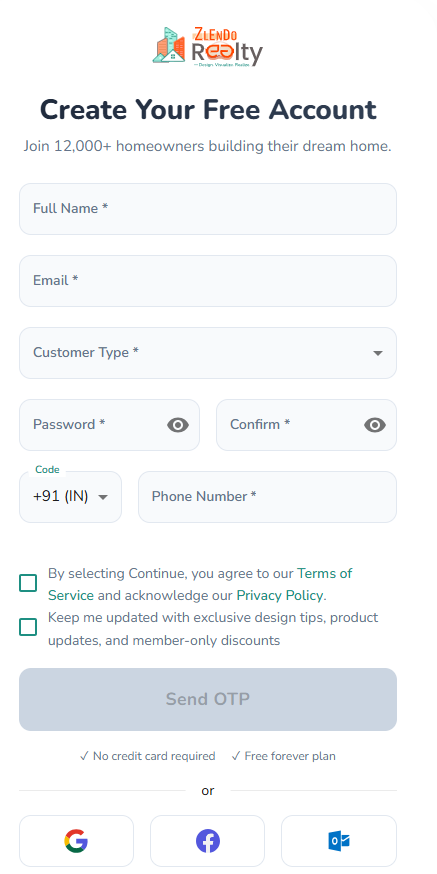
To start a Zlendo Realty account fill out the Account creation / Sign Up form.
Fill all the fields in the form: Start with your Name and Email address.
Choose Customer Type from the drop-down list. Select the category that best describes why you want to use Zlendo Realty
(e.g., Homeowner if you want to use Zlendo Realty to visualize your dream home plan.)
In the Password field, type in your password and confirm it.
Your password must have at least:
– one uppercase letter
– one lowercase letter
– one number
– one special character
To view or check the password you have entered and confirmed, click on the eye icon.
Check the first green box to agree to the Zlendo Realty Terms of Service and Privacy Policy.
Check the second green box to receive exclusive design tips, product updates, and member-only discounts
You can now click on the OTP button.
You will now receive an OTP on your registered mobile number. Use it to complete the Sign-up process.
After Signing up, check your email for the verification link.
Click on the email verification link to complete your first-time sign in and access your new Zlendo Realty Account.
Zlendo Realty Account for Business
The Zlendo Realty Business Account is built for Architecture and construction companies.
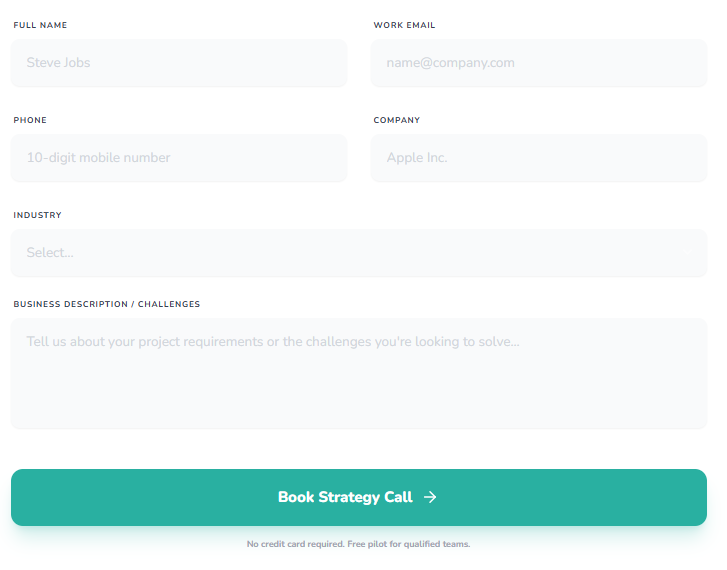
Book a Demo and you can experience the Zlendo Realty cutting-edge advantage with an expert-guided tour in real-time.
Fill out the Demo request form including your name, work email, mobile number, Company Name, and Industry.
Specify design challenges you would like to solve to help us give you the best Zlendo Realty strategy.
Need more help?
Can't find the answer you're looking for? Our team is here to help you.
Contact SupportRelated Articles
Export Plan & Floorplan Generator Tool
Export Plans Floorplan Generator Toolbar Current Floor Button: Quickly switch between different floors/levels of your project to view or export specific floors. Reset View & Zoom Icons: Use these to instantly reset your design or adjust the magnification for a detailed look. Style Selector: Customize the visual aesthetic of your plan by choosing from several…
Zlendo Realty Community: Creating Project Templates & Sharing Designs
The Zlendo Realty Community is a vibrant digital hub designed for architects, interior designers, and home enthusiasts to connect and grow. It serves as a collaborative space where creativity meets professional insight, allowing users to move beyond individual drafting and into a shared ecosystem of design. Sharing Design Templates Community –> Share Post –> Recent…
Payment & Billing
There are several ways to view the Plan cards and to Upgrade your current plan to a paid version. Steps to Upgrade 1. From the Zlendo Realty Dashboard On the Dashboard left-hand sidebar, click on the Plan tab. Alternatively, you can also click on: – the Upgrade Now button located in the promotional banner at…