Zlendo Realty Cost Estimation Tool
The Zlendo Realty Cost Estimation Tool is an AI-driven feature designed to provide instant financial clarity for your property projects. By integrating market data, construction rates, and design choices, it eliminates guesswork in budgeting.
Get Accurate Estimates with just one click.
Our estimation tool uses AI Property Valuation and machine learning to analyze real-time market trends and local construction costs.
How to Generate an Estimate
When you start a New Project, enter all the basic details in the form. Provide the property type, total area, location, and specific layout features and budget range.
Using the data entered in the Project form, advanced algorithms calculate the most accurate cost or market valuation from multiple reliable sources, including current construction material rates and recent sales history in your area.
Workspace tool bar –> Cost tool after your 2D Floor Plan has been digitized/completed.
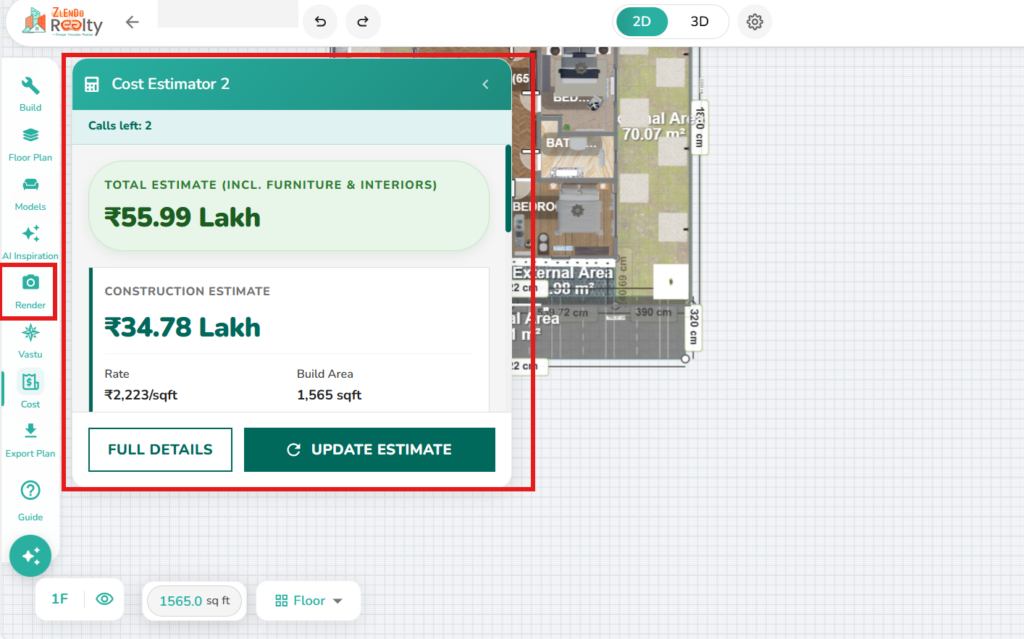
Viewing the Cost Estimate Report
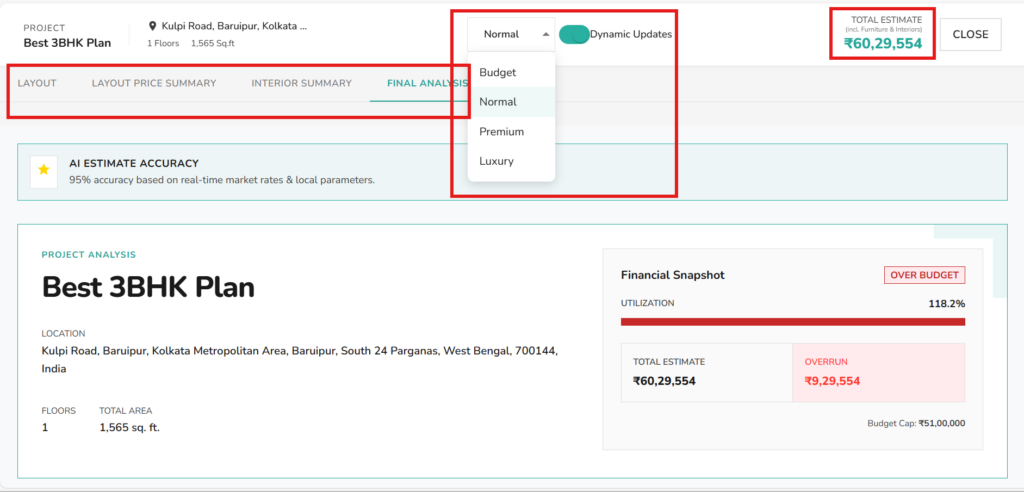
In the Workspace Cost Estimator Popup –> Full Details button –> Dynamic Updates to see real-time changes.
You can view the Estimation Report by:
Select Material Costing Options: Budget/Normal/Premium/Luxury (Prices will change in your report accordingly)
Layout costs: Project Scope, Materials Costs, Current Layout
Price Summary: Summary of Total Pricing
Interior Summary: Room-by-Room Materials List and Price Summary
Final Analysis: Financial Snapshot, Cost distribution, AI cost intelligence, Detailed Cost Breakdown.
💡Reliable Estimation Tips
Be Specific with Location: Construction costs vary significantly by region; ensure your location settings are accurate for the most precise rates.
Use Realistic Materials: Select the materials you actually intend to use in the 3D editor to get a refined budget rather than a general draft.
Plan for Contingencies: While our AI reduces errors, we recommend including a small buffer for unexpected site conditions or specialized custom artistry.
📌 See also: Tips for Creating New Projects.
Need more help?
Can't find the answer you're looking for? Our team is here to help you.
Contact SupportRelated Articles
Export Plan & Floorplan Generator Tool
Export Plans Floorplan Generator Toolbar Current Floor Button: Quickly switch between different floors/levels of your project to view or export specific floors. Reset View & Zoom Icons: Use these to instantly reset your design or adjust the magnification for a detailed look. Style Selector: Customize the visual aesthetic of your plan by choosing from several…
Zlendo Realty Community: Creating Project Templates & Sharing Designs
The Zlendo Realty Community is a vibrant digital hub designed for architects, interior designers, and home enthusiasts to connect and grow. It serves as a collaborative space where creativity meets professional insight, allowing users to move beyond individual drafting and into a shared ecosystem of design. Sharing Design Templates Community –> Share Post –> Recent…
Payment & Billing
There are several ways to view the Plan cards and to Upgrade your current plan to a paid version. Steps to Upgrade 1. From the Zlendo Realty Dashboard On the Dashboard left-hand sidebar, click on the Plan tab. Alternatively, you can also click on: – the Upgrade Now button located in the promotional banner at…